Data Analyzers
Tobii-PyTracker provides analyzers for summarizing gaze distributions, detecting fixations and saccades, constructing scanpaths, measuring spatial dispersion, identifying attended image regions, and aligning gaze with speech.
Note, that all of the results can be reproduced from the scripts in examples directory.
The examples directory contains jupyter notebooks for eah analyzers and for all supported modalities (text, image, and time-series)
See examples for more details.
Analysis Units and Scope
Most Tobii-PyTracker analyses use two identifiers:
set_nameIdentifies a single experiment outcome. In a typical study, it corresponds to one participant’s recorded session, although its exact meaning depends on how the experiment was configured.
slide_indexIdentifies the position of an item within an experiment. The item is typically a slide, image, screen, or other stimulus presented to the participant.
Some analyzers support the per argument, which controls the scope at which
the results are computed:
per="global"Combines all available gaze samples into one result. This scope provides an overall summary, but differences between participants and experimental items are no longer visible.
per="set"Produces one result for each
set_name. This scope is useful for comparing participants or complete experiment outcomes across all their items.per="slide"Produces one result for each
set_nameandslide_indexcombination. This is usually the most detailed scope and allows individual items within each experiment outcome to be compared.
The scope affects analytical aggregation only. For example, global entropy describes the gaze distribution in the complete dataset, whereas slide-level entropy describes the distribution for one item presented during one experiment.
Available Analyzers
HeatmapAnalyzersummarizes gaze locations and produces gaze-density maps.FocusMapAnalyzeremphasizes regions receiving little or no gaze.SaccadeAnalyzerdetects rapid gaze movements using velocity or acceleration thresholds.FixationAnalyzerdetects periods of relatively stable gaze.EntropyAnalyzermeasures the spatial distribution and coverage of gaze.ClusterAnalyzeridentifies spatial groups of gaze samples.ScanpathsAnalyzerconstructs transitions between consecutive fixations.BBoxAttentionAnalyzermeasures attention within predefined or automatically generated image regions.VoiceTranscriptiontranscribes recordings and aligns speech with gaze.
Loading Data
from pathlib import Path

from tobii_pytracker.data_loader import DataLoader
from tobii_pytracker.custom_config import CustomConfig
from tobii_pytracker.analyze.models import (
    HeatmapAnalyzer,
    FocusMapAnalyzer,
    SaccadeAnalyzer,
    FixationAnalyzer,
    EntropyAnalyzer,
    ClusterAnalyzer,
    ScanpathsAnalyzer,
    BBoxAttentionAnalyzer,
    VoiceTranscription,
)

config = CustomConfig("./configs/config.yaml")
loader = DataLoader(config, root="./")

gaze_data = loader.get_all_data(flatten=True)
output_dir = Path("./analysis_outputs")
The flattened data normally contain one row per gaze sample. The principal
columns are avg_gaze_x and avg_gaze_y. Event-based analyses also use
system_time, while set_name and slide_index associate each sample
with an experiment outcome and item.
Heatmaps and Focus Maps
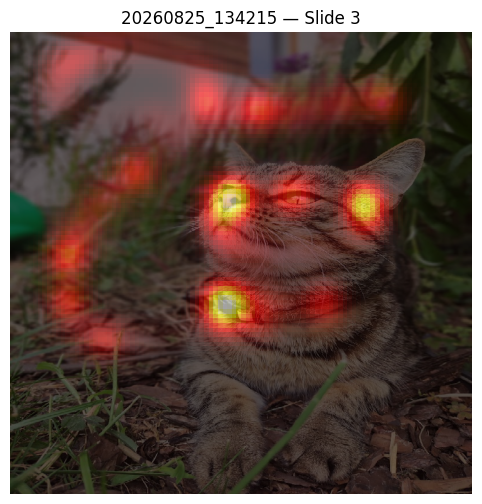
HeatmapAnalyzer summarizes the number and average position of gaze samples
at the selected scope.
heatmap_analyzer = HeatmapAnalyzer(output_folder=output_dir)

global_summary = heatmap_analyzer.analyze(
    gaze_data,
    per="global",
)

slide_summaries = heatmap_analyzer.analyze(
    gaze_data,
    per="slide",
)
The output contains:
avg_gaze_xandavg_gaze_yThe centroid of all gaze samples in the corresponding group. It indicates the general center of visual attention, but does not show whether the samples form one concentrated region or several separate regions.
gaze_countThe number of valid gaze samples contributing to the result. It can reflect viewing duration when the sampling frequency is stable, but it is not a direct duration measure.
A heatmap provides additional spatial detail by showing where observations accumulate. Compact high-density regions indicate concentrated viewing, whereas several distinct regions indicate that attention was distributed across multiple parts of the stimulus.
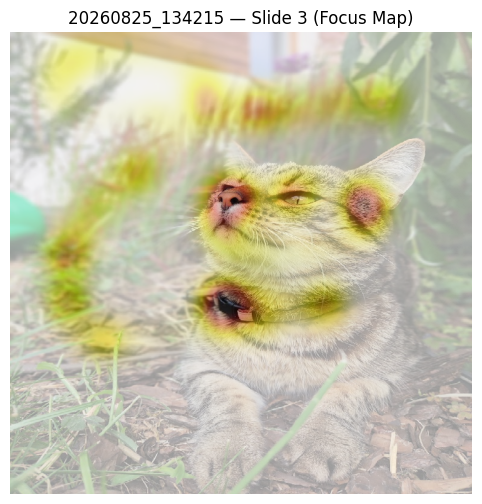
FocusMapAnalyzer uses the same summary output but provides an inverted
view of gaze density. It is useful for identifying areas that received little
or no visual attention. Such areas should be interpreted as unattended within
the available recording, not necessarily as irrelevant to the participant.
Fixations
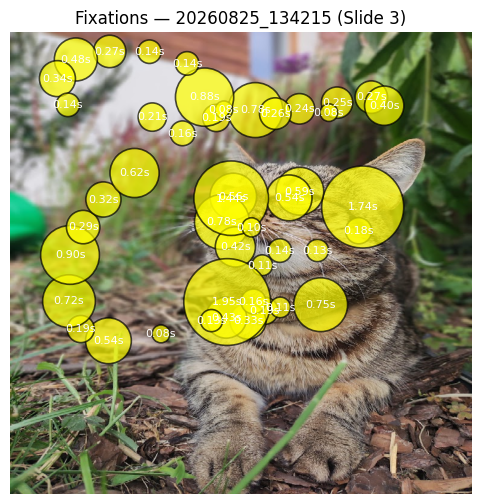
FixationAnalyzer identifies periods during which gaze remains within a
limited spatial area. It supports dispersion-threshold identification
(method="dispersion") and velocity-threshold identification
(method="velocity").
fixation_analyzer = FixationAnalyzer(
    output_folder=output_dir,
    method="dispersion",
    dispersion_threshold=60.0,
    min_duration=0.08,
)

fixations = fixation_analyzer.analyze(gaze_data)
The output contains one row per detected fixation:
fix_startandfix_endThe fixation boundaries on the experiment clock.
durationThe time for which gaze remained within the detected fixation. Longer fixations indicate longer visual engagement with a location, although their meaning depends on the task and stimulus.
x_meanandy_meanThe spatial center of the fixation.
dispersionThe spatial spread of samples assigned to the fixation. Lower values indicate more tightly grouped gaze samples.
The results can be used to compare the number, duration, position, and spatial stability of fixations between experimental items. Threshold values should be selected with respect to the sampling frequency, coordinate system, viewing geometry, and experimental task. Fixation identification methods are discussed by Holmqvist et al. [1] and Salvucci and Goldberg [2].
Saccades
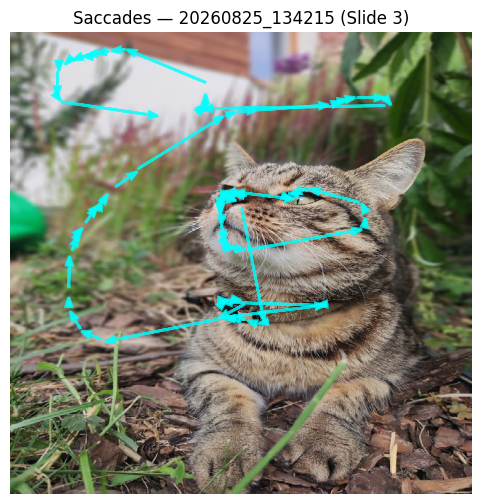
SaccadeAnalyzer detects rapid movements between gaze locations. It supports
velocity-threshold identification (method="ivt") and
acceleration-threshold detection.
saccade_analyzer = SaccadeAnalyzer(
    output_folder=output_dir,
    method="ivt",
    velocity_threshold=120.0,
    acceleration_threshold=6000.0,
    min_duration=0.015,
    filter_micro_saccades=False,
)

saccades = saccade_analyzer.analyze(gaze_data)
The output contains:
start_time,end_time, anddurationThe temporal location and duration of the detected movement.
x_start,y_start,x_end, andy_endThe origin and destination of the movement.
amplitudeThe straight-line distance between the start and end positions, expressed in the coordinate units used by the input data.
peak_velocityandmean_velocityThe maximum and average movement velocities within the detected event.
mean_accelerationThe mean absolute change in velocity during the event.
Together, these values describe how far and how rapidly gaze moved. Larger amplitudes represent transitions between more distant locations, while high peak velocity indicates a rapid gaze shift. Velocity and acceleration values are expressed in pixels per second and pixels per second squared when pixel coordinates and seconds are used.
Entropy and Spatial Dispersion
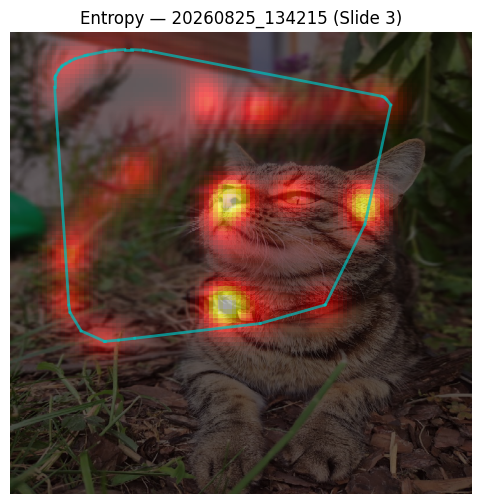
EntropyAnalyzer characterizes how gaze is distributed across the stimulus.
entropy_analyzer = EntropyAnalyzer(output_folder=output_dir)

entropy_results = entropy_analyzer.analyze(
    gaze_data,
    per="slide",
    bins=100,
    use_convex_hull=True,
)
The output contains:
entropyShannon entropy of the two-dimensional gaze histogram. Higher values indicate that gaze samples are distributed more evenly across occupied spatial bins. Lower values indicate a more concentrated distribution.
convex_hull_areaThe area of the smallest convex region enclosing the gaze samples. A larger area indicates broader spatial coverage, but this measure can be strongly influenced by isolated or noisy samples.
num_pointsThe number of valid gaze samples used to calculate the metrics.
Entropy and convex-hull area capture different properties. Gaze may cover a large area but still have low entropy if most samples are concentrated in one location. Conversely, a smaller region can have relatively high entropy when samples are distributed evenly within it. Entropy values should only be compared when the same binning and coordinate conventions are used. The entropy calculation follows Shannon’s formulation [3].
Gaze Clustering
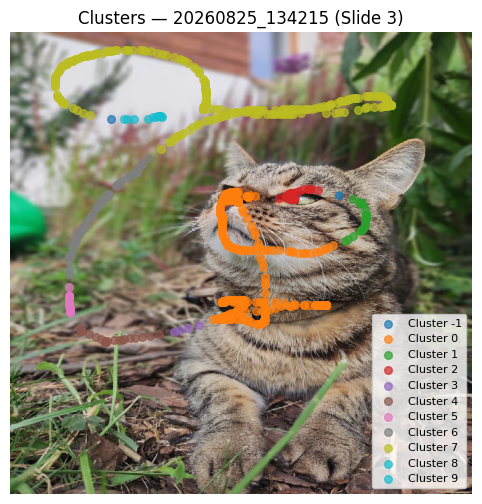
ClusterAnalyzer groups spatially related gaze samples using DBSCAN by
default. K-means and compatible custom clustering models can also be used.
cluster_analyzer = ClusterAnalyzer(
    output_folder=output_dir,
    eps=20,
    min_samples=3,
)

clustered_data = cluster_analyzer.analyze(gaze_data)
The output preserves the original gaze data and adds a cluster column.
Samples with the same label belong to the same spatial group. For DBSCAN,
cluster=-1 identifies samples classified as noise.
Clusters can indicate recurring regions of visual attention. Their location shows which parts of the stimulus attracted gaze, while the number of samples in a cluster represents its relative support in the recording. Clusters are not automatically equivalent to semantic Areas of Interest, because the algorithm uses spatial coordinates rather than the meaning of image content.
The interpretation depends strongly on eps and min_samples. DBSCAN is
described by Ester et al. [4].
Scanpaths
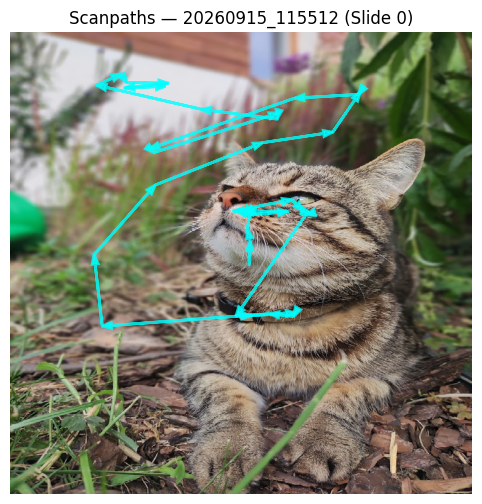
ScanpathsAnalyzer represents the order in which fixation locations were
visited. It accepts detected fixations directly or applies the default
FixationAnalyzer when raw gaze data are supplied.
scanpath_analyzer = ScanpathsAnalyzer(output_folder=output_dir)

scanpaths = scanpath_analyzer.analyze(
    fixations,
    per="slide",
)
Each output row represents a transition between two consecutive fixations:
from_fixationandto_fixationThe sequential indices of the connected fixations.
x_start,y_start,x_end, andy_endThe spatial endpoints of the transition.
distanceThe straight-line distance between the fixation centroids.
transition_durationThe time between the end of the first fixation and the beginning of the next fixation.
start_durationandend_durationThe durations of the two connected fixations.
The output can be used to examine viewing order, repeated transitions, and movement between distant parts of a stimulus. A scanpath describes temporal sequence and therefore contains information that is not available from a heatmap alone. Scanpaths are commonly represented as ordered fixations connected by gaze transitions [1].
Attention to Image Regions
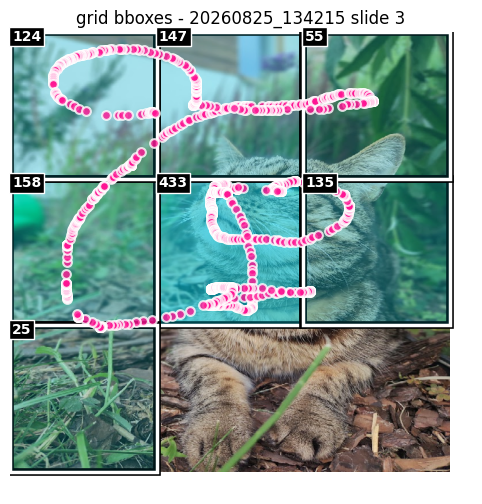
BBoxImagesAnalyzer assigns gaze samples or detected fixations to image
regions stored in objects_bboxes. These regions can represent manually
defined Areas of Interest or regions generated using grid, superpixel, or
saliency-based methods.
bbox_analyzer = BBoxImagesAnalyzer(output_folder=output_dir, config=config)
scores = bbox_analyzer.analyze(background_data=background_data)
bbox_analyzer.plot_analysis(
         scored_bboxes=scores,
         gaze_data=selected_gaze,
         screenshot_path=screenshot_path,
         set_name=set_name,
         slide_index=slide_index,
         top_k=25,
         min_hits=1,
         title=f'Grid bboxes - {set_name} slide {slide_index}',
         save_path=plot_path,
     )
The scored-region output indicates which regions contain gaze observations. The scores includes:
generated_bbox_countNumber of candidate image regions.
total_gaze_pointsNumber of gaze samples considered.
bbox_hit_countTotal number of gaze-to-region assignments. This can exceed the number of gaze samples when regions overlap.
unique_gaze_hit_countandcoverage_by_bboxesNumber and proportion of gaze samples covered by at least one region.
overlap_factorDegree to which gaze samples are assigned to multiple overlapping regions.
attended_bboxesandattended_bbox_ratioNumber and proportion of regions receiving at least one gaze hit.
These metrics help determine which image regions attracted attention and whether the supplied regions adequately cover the observed gaze. Coverage describes the region representation as well as participant attention. It should therefore not be interpreted as attention alone. SLIC superpixels are described by Achanta et al. [5].
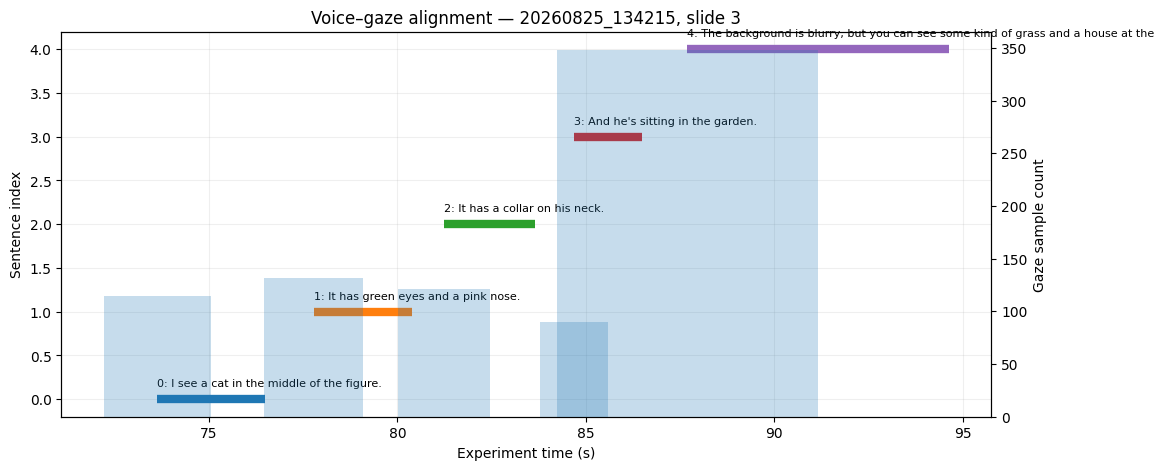
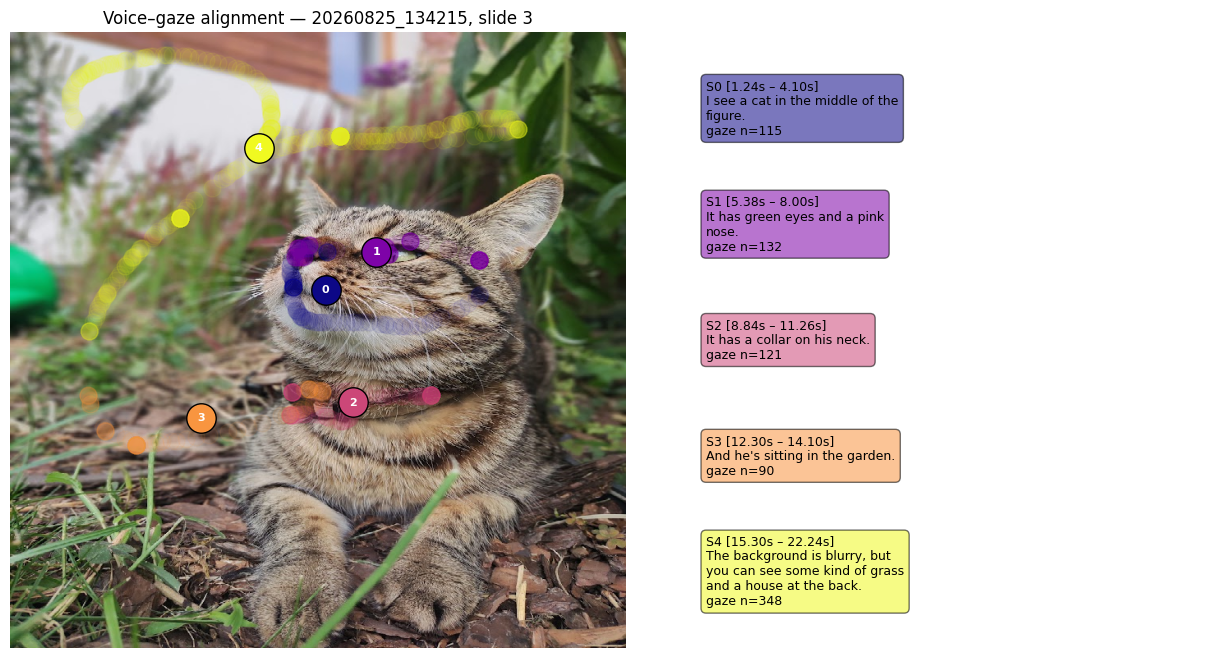
Voice and Gaze Alignment
VoiceTranscription uses Whisper to transcribe each item’s voice recording
and align sentence time windows with gaze samples recorded on the same
experiment clock.
transcription_analyzer = VoiceTranscription(
    output_folder=output_dir,
    loader_root=loader.root,
    model_name="medium",
    language="en",
    sentence_gap_threshold=0.6,
    max_sentence_duration=12.0,
    audio_start_offset_sec=0.0,
    store_gaze_points=True,
)

transcription = transcription_analyzer.analyze(
    background_data=gaze_data,
    per="slide",
)
The result contains one row per transcript sentence or sentence-like segment:
sentence_textTranscribed speech corresponding to the time interval.
rel_startandrel_endSegment boundaries relative to the beginning of the audio recording.
abs_startandabs_endSegment boundaries expressed on the experiment clock.
gaze_sample_countNumber of gaze samples recorded during the segment.
avg_gaze_x_meanandavg_gaze_y_meanMean gaze location while the corresponding content was spoken.
avg_gaze_x_stdandavg_gaze_y_stdSpatial variability of gaze during the segment.
gaze_pointsIndividual aligned gaze observations, included when
store_gaze_points=True.
The results connect spoken content with visual attention. They can indicate where the participant looked while a particular statement was made and how stable or dispersed gaze was during that statement. This is useful in think-aloud protocols, narrated presentations, and other multimodal experiments. The alignment is temporal and does not by itself establish that the spoken sentence caused attention to a particular region.
VoiceTranscription processes each recording internally by set_name and
slide_index, even if another value of per is supplied, because every
item may have a separate audio file and start timestamp. Whisper is described
by Radford et al. [6].