Mouse EyeTracker Emulation
Tobii-Pytracker supports emulation of eye-tracking data using mouse movements. This feature is particularly useful for testing and development purposes when a physical eye tracker is not available.
Configuration
To enable mouse emulation, you need to specify the mouse eye tracker configuration file in your main configuration file (e.g., config.yaml). The default, working configuration is provided in configs/mouse_eyetracker_config.yaml.
The remaining usage of the tobii-pytracker remains the same as with a physical eye tracker, except that the gaze data will be derived from mouse movements.
Data Collection
When using the mouse eye tracker emulation, the gaze data will be recorded in the same format as with a physical eye tracker. You can analyze this data using the same tools and methods provided by Tobii-Pytracker. The mouse movements will simulate gaze positions, allowing you to test the functionality of your experiments without needing actual eye-tracking hardware. The pupil size will not be simulated and will typically be recorded as a constant or default value.
Mouse Control
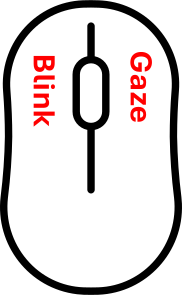
You can define the behavior of the mouse eye tracker in the mouse_eyetracker_config.yaml file. This includes settings such as sensitivity, calibration options, and other parameters that affect how mouse movements are translated into gaze data. Default configuration assumes following behavior of mouse movements and buttons:
Moving the mouse cursor without any button pressed does not have any effect on collected data
Right mouse button pressed, and moving the mouse will simulate gaze position changes
Left mouse button pressed simulating a blink event